
المدونة

  • What Is Antivirus Software and Do You Really Need It in 2026? #3

    What Is Antivirus Software and Do You Really Need It in 2026? #3

    What is antivirus software?

    Antivirus software is a security program designed to detect, block, and remove malicious software (malware) from your devices. It scans files, monitors system behavior, and updates regularly to recognize new threats.

    How antivirus software works

    Modern antivirus tools use multiple layers of protection:

    • Signature-based detection: Matches files against a database of known malware.
    • Heuristic analysis: Identifies suspicious behavior patterns in unfamiliar programs.
    • Real-time scanning: Continuously monitors downloads, emails, and running apps.
    • Cloud-based threat intelligence: Leverages global data to spot emerging threats faster.

    Do you need antivirus in 2026?

    Yes—if you use Windows, Android, or even macOS. While built-in tools like Microsoft Defender offer solid baseline protection, dedicated antivirus suites provide stronger defenses against ransomware, phishing, and zero-day attacks.zdnet+1

    Who benefits most from antivirus software?

    • Home users browsing, shopping, or banking online
    • Remote workers handling sensitive data
    • Gamers and streamers downloading large files
    • Parents managing children’s device usage

    Bottom line

    Antivirus software remains essential in 2026. With AI-powered malware on the rise, a trusted security suite adds a critical layer of defense beyond your operating system’s default tools.

  • What Is Antivirus Software and Do You Really Need It in 2026? #4

    What Is Antivirus Software and Do You Really Need It in 2026? #4

    What is antivirus software?

    Antivirus software is a security program designed to detect, block, and remove malicious software (malware) from your devices. It scans files, monitors system behavior, and updates regularly to recognize new threats.

    How antivirus software works

    Modern antivirus tools use multiple layers of protection:

    • Signature-based detection: Matches files against a database of known malware.
    • Heuristic analysis: Identifies suspicious behavior patterns in unfamiliar programs.
    • Real-time scanning: Continuously monitors downloads, emails, and running apps.
    • Cloud-based threat intelligence: Leverages global data to spot emerging threats faster.

    Do you need antivirus in 2026?

    Yes—if you use Windows, Android, or even macOS. While built-in tools like Microsoft Defender offer solid baseline protection, dedicated antivirus suites provide stronger defenses against ransomware, phishing, and zero-day attacks.zdnet+1

    Who benefits most from antivirus software?

    • Home users browsing, shopping, or banking online
    • Remote workers handling sensitive data
    • Gamers and streamers downloading large files
    • Parents managing children’s device usage

    Bottom line

    Antivirus software remains essential in 2026. With AI-powered malware on the rise, a trusted security suite adds a critical layer of defense beyond your operating system’s default tools.
  • 7 Ways to Improve Your Internet Speed at Home #2

    7 Ways to Improve Your Internet Speed at Home #2

    Meta description: Slow internet? Try these 7 proven tips to boost your home Wi-Fi speed, reduce lag, and enjoy smoother streaming and browsing.

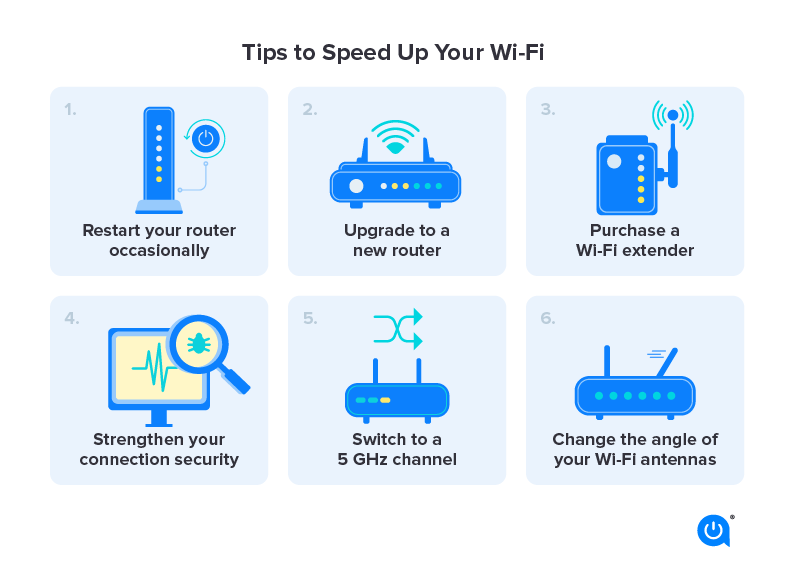
    1. Restart your router and modem

    Power-cycling your equipment clears temporary glitches and can instantly improve performance. Unplug for 30 seconds, then plug back in.

    2. Place your router in a central location

    Wi-Fi signals weaken through walls and metal objects. Keep your router elevated, away from microwaves, cordless phones, and large appliances.

    3. Switch to the 5 GHz band

    Most modern routers offer both 2.4 GHz and 5 GHz bands. The 5 GHz band is faster and less crowded—ideal for streaming and gaming.

    4. Limit background devices and apps

    Too many devices or apps (like cloud backups or video calls) can hog bandwidth. Pause unnecessary downloads and disconnect unused devices.

    5. Update your router’s firmware

    Manufacturers release updates to fix bugs and improve security. Check your router’s admin panel or the manufacturer’s website for updates.

    6. Use an Ethernet cable for critical devices

    For gaming consoles, smart TVs, or work laptops, a wired connection provides faster, more stable speeds than Wi-Fi.

    7. Consider upgrading your plan or equipment

    If you’ve tried everything and speeds are still slow, your ISP plan may be outdated—or your router may need replacing. Look for plans with higher Mbps and routers supporting Wi-Fi 6.

  • 7 Ways to Improve Your Internet Speed at Home #3

    7 Ways to Improve Your Internet Speed at Home #3

    Meta description: Slow internet? Try these 7 proven tips to boost your home Wi-Fi speed, reduce lag, and enjoy smoother streaming and browsing.

    1. Restart your router and modem

    Power-cycling your equipment clears temporary glitches and can instantly improve performance. Unplug for 30 seconds, then plug back in.

    2. Place your router in a central location

    Wi-Fi signals weaken through walls and metal objects. Keep your router elevated, away from microwaves, cordless phones, and large appliances.

    3. Switch to the 5 GHz band

    Most modern routers offer both 2.4 GHz and 5 GHz bands. The 5 GHz band is faster and less crowded—ideal for streaming and gaming.

    4. Limit background devices and apps

    Too many devices or apps (like cloud backups or video calls) can hog bandwidth. Pause unnecessary downloads and disconnect unused devices.

    5. Update your router’s firmware

    Manufacturers release updates to fix bugs and improve security. Check your router’s admin panel or the manufacturer’s website for updates.

    6. Use an Ethernet cable for critical devices

    For gaming consoles, smart TVs, or work laptops, a wired connection provides faster, more stable speeds than Wi-Fi.

    7. Consider upgrading your plan or equipment

    If you’ve tried everything and speeds are still slow, your ISP plan may be outdated—or your router may need replacing. Look for plans with higher Mbps and routers supporting Wi-Fi 6.

  • 7 Ways to Improve Your Internet Speed at Home #4

    7 Ways to Improve Your Internet Speed at Home #4

    Meta description: Slow internet? Try these 7 proven tips to boost your home Wi-Fi speed, reduce lag, and enjoy smoother streaming and browsing.

    1. Restart your router and modem

    Power-cycling your equipment clears temporary glitches and can instantly improve performance. Unplug for 30 seconds, then plug back in.

    2. Place your router in a central location

    Wi-Fi signals weaken through walls and metal objects. Keep your router elevated, away from microwaves, cordless phones, and large appliances.

    3. Switch to the 5 GHz band

    Most modern routers offer both 2.4 GHz and 5 GHz bands. The 5 GHz band is faster and less crowded—ideal for streaming and gaming.

    4. Limit background devices and apps

    Too many devices or apps (like cloud backups or video calls) can hog bandwidth. Pause unnecessary downloads and disconnect unused devices.

    5. Update your router’s firmware

    Manufacturers release updates to fix bugs and improve security. Check your router’s admin panel or the manufacturer’s website for updates.

    6. Use an Ethernet cable for critical devices

    For gaming consoles, smart TVs, or work laptops, a wired connection provides faster, more stable speeds than Wi-Fi.

    7. Consider upgrading your plan or equipment

    If you’ve tried everything and speeds are still slow, your ISP plan may be outdated—or your router may need replacing. Look for plans with higher Mbps and routers supporting Wi-Fi 6.

  • How to Choose Antivirus Software: A 2026 Buyer’s Guide

    How to Choose Antivirus Software: A 2026 Buyer’s Guide

    Step 1: Check independent lab results

    Reputable testing organizations like AV-TEST and AV-Comparatives evaluate antivirus products on:

    • Malware detection rates
    • False positive rates
    • System performance impact
      Look for products with “Top Product” or “Advanced+” ratings.antivirus-review

    Step 2: Match features to your needs

    Basic users may only need:

    • Real-time protection
    • Automatic updates
    • Web/phishing shielding

    Power users or families might want:

    • Parental controls
    • Password manager
    • VPN included
    • Cloud backup
    • Identity theft monitoring

    Step 3: Consider device compatibility

    Ensure the antivirus supports all your devices:

    • Windows 10/11: Full feature support across most suites
    • macOS: Bitdefender, Norton, and Avira offer strong Mac versions
    • Android/iOS: Look for mobile-specific protections like app scanning and anti-theft

    Step 4: Evaluate performance impact

    Some antivirus programs can slow down your PC during scans or updates. According to 2026 tests:

    • Norton and TotalAV are light on CPU usage
    • Bitdefender offers the best detection but can be resource-intensive during full scansyoutube

    Step 5: Compare pricing and value

    Most top-tier suites start around $30/year for single-device plans. Multi-device or family plans often deliver better value. Watch for seasonal discounts—many providers offer 50–80% off during promotions.youtubezdnet

    Step 6: Read real user reviews

    Check Trustpilot, Reddit, and tech forums for:

    • Customer support responsiveness
    • Ease of uninstallation
    • Renewal pricing surprises
    • False alarms or blocked legitimate apps

    Final tip: Avoid outdated or risky brands

    Kaspersky, once a top choice, is now restricted in the U.S. due to national security concerns. Always verify a vendor’s reputation and update policy before purchasing.zdnet

  • Best Antivirus Software of 2026: Top Picks for Windows, Mac, and Mobile

    Best Antivirus Software of 2026: Top Picks for Windows, Mac, and Mobile

    Top antivirus picks for 2026

    Based on independent lab tests and expert reviews, these are the leading antivirus solutions this year:pcmag+2

    AntivirusBest ForStarting PriceFree Plan
    BitdefenderOverall protection & performance~$30/yearYes
    Norton 360All-in-one security suite~$30/yearNo
    TotalAVPC optimization + ease of use~$30/yearNo
    MalwarebytesSecondary scanner & malware cleanup~$45/yearYes (limited)
    Avira Free SecurityBest free antivirusFreeYes

    Why Bitdefender leads the pack

    Bitdefender consistently earns top marks in malware detection, with minimal impact on system performance. It offers ransomware remediation, a secure browser, and privacy tools like a VPN and webcam protection.youtubezdnet

    Norton 360: The complete security fortress

    Norton combines real-time threat protection, a firewall, password manager, cloud backup, and identity theft monitoring—all in one user-friendly app. It’s ideal for users who want “set it and forget it” security.youtubezdnet

    TotalAV for simplicity and speed

    TotalAV shines in usability and system cleanup tools. It’s fast, lightweight, and great for non-tech users who want strong protection without complexity.securityyoutube

    Free options worth considering

    • Avira Free Security: Includes real-time scanning, a VPN, and system optimizer.zdnet
    • Malwarebytes Free: Excellent as a second-opinion scanner alongside your main antivirus.zdnet

    How to choose the right antivirus

    Ask yourself:

    • Do I need multi-device coverage?
    • Is a VPN or password manager important?
    • Do I prioritize speed or maximum features?
    • Am I on a tight budget?

    Match your needs to the strengths of each product above.

  • What Is Antivirus Software and Do You Really Need It in 2026?

    What Is Antivirus Software and Do You Really Need It in 2026?

    What is antivirus software?

    Antivirus software is a security program designed to detect, block, and remove malicious software (malware) from your devices. It scans files, monitors system behavior, and updates regularly to recognize new threats.

    How antivirus software works

    Modern antivirus tools use multiple layers of protection:

    • Signature-based detection: Matches files against a database of known malware.
    • Heuristic analysis: Identifies suspicious behavior patterns in unfamiliar programs.
    • Real-time scanning: Continuously monitors downloads, emails, and running apps.
    • Cloud-based threat intelligence: Leverages global data to spot emerging threats faster.

    Do you need antivirus in 2026?

    Yes—if you use Windows, Android, or even macOS. While built-in tools like Microsoft Defender offer solid baseline protection, dedicated antivirus suites provide stronger defenses against ransomware, phishing, and zero-day attacks.zdnet+1

    Who benefits most from antivirus software?

    • Home users browsing, shopping, or banking online
    • Remote workers handling sensitive data
    • Gamers and streamers downloading large files
    • Parents managing children’s device usage

    Bottom line

    Antivirus software remains essential in 2026. With AI-powered malware on the rise, a trusted security suite adds a critical layer of defense beyond your operating system’s default tools.
  • Internet Safety Tips: How to Stay Secure Online in 2026

    Internet Safety Tips: How to Stay Secure Online in 2026

    Meta description: Protect yourself online with these essential internet safety tips. Learn about strong passwords, phishing, secure Wi-Fi, and privacy tools.

    Use strong, unique passwords

    Avoid reusing passwords. Use a mix of letters, numbers, and symbols—or better yet, a password manager to generate and store complex passwords.

    Enable two-factor authentication (2FA)

    2FA adds a second layer of security by requiring a code from your phone or an authenticator app, even if someone knows your password.

    Beware of phishing scams

    Phishing emails and messages pretend to be from trusted companies to steal your data. Never click suspicious links or download unexpected attachments.

    Secure your home Wi-Fi

    • Change your router’s default admin password.
    • Use WPA3 or WPA2 encryption.
    • Hide your network name (SSID) if you don’t need guests to connect.

    Keep software up to date

    Operating systems, browsers, and apps regularly patch security holes. Enable automatic updates whenever possible.

    Use a trusted VPN on public Wi-Fi

    Public hotspots at cafés or airports can be insecure. A reputable Virtual Private Network (VPN) encrypts your traffic and hides your IP address.

    Review app and website permissions

    Regularly check which apps have access to your location, camera, microphone, and contacts. Revoke permissions you don’t need.

  • 7 Ways to Improve Your Internet Speed at Home

    7 Ways to Improve Your Internet Speed at Home

    Meta description: Slow internet? Try these 7 proven tips to boost your home Wi-Fi speed, reduce lag, and enjoy smoother streaming and browsing.

    1. Restart your router and modem

    Power-cycling your equipment clears temporary glitches and can instantly improve performance. Unplug for 30 seconds, then plug back in.

    2. Place your router in a central location

    Wi-Fi signals weaken through walls and metal objects. Keep your router elevated, away from microwaves, cordless phones, and large appliances.

    3. Switch to the 5 GHz band

    Most modern routers offer both 2.4 GHz and 5 GHz bands. The 5 GHz band is faster and less crowded—ideal for streaming and gaming.

    4. Limit background devices and apps

    Too many devices or apps (like cloud backups or video calls) can hog bandwidth. Pause unnecessary downloads and disconnect unused devices.

    5. Update your router’s firmware

    Manufacturers release updates to fix bugs and improve security. Check your router’s admin panel or the manufacturer’s website for updates.

    6. Use an Ethernet cable for critical devices

    For gaming consoles, smart TVs, or work laptops, a wired connection provides faster, more stable speeds than Wi-Fi.

    7. Consider upgrading your plan or equipment

    If you’ve tried everything and speeds are still slow, your ISP plan may be outdated—or your router may need replacing. Look for plans with higher Mbps and routers supporting Wi-Fi 6.